
Google Consent Mode v2 lets Google tags, such as Google Analytics 4, Google Ads and Floodlight, adjust to the visitor’s consent choice. Beautiful Cookie Banner sends these consent signals from WordPress with the Premium add-on. This page explains how it works. For a step-by-step setup with example configurations, see the Google Consent Mode v2 setup example.
What Google Consent Mode v2 is
Your site tells Google tags, per consent type, whether the visitor granted or denied it. Google added two types in 2024 (“v2”): ad_user_data and ad_personalization. The consent types are:
| Consent type | Controls |
|---|---|
analytics_storage | Storage for analytics, e.g. Google Analytics cookies |
ad_storage | Storage for advertising, e.g. Google Ads cookies |
ad_user_data | Sending user data to Google for advertising |
ad_personalization | Personalised advertising (remarketing) |
functionality_storage, personalization_storage, security_storage | Optional types for site functions, preferences and security |
A default state is set before any Google tag runs. When the visitor makes a choice in the cookie banner, an update is sent.
Basic and advanced mode
- Basic mode: Google tags load only after the visitor has consented. Before that, nothing is sent to Google.
- Advanced mode: Google tags always load. While consent is denied, they send cookieless pings, which Google uses to model the missing data.
Beautiful Cookie Banner sends the consent signals in both cases. Whether your tags load before consent is decided by your setup: service blocking or consent triggers in Google Tag Manager. Which mode fits your site is your decision; this page does not give legal advice.
What Beautiful Cookie Banner sets
- Default: a
gtag("consent", "default", …)call in the<head>, before your tags. Every consent type isdeniedunless it is mapped to a category that is “default checked”. - Mapping: you choose which banner categories grant which consent type, e.g. “marketing” grants
ad_storage. A consent type is granted as soon as one of its categories is allowed. - Update: when the visitor saves a choice, a
gtag("consent", "update", …)call follows straight away, without a reload. On later page views, the update comes right after the default. - Options:
ads_data_redaction,url_passthroughandwait_for_update. - dataLayer events:
consent_mode_defaultandconsent_mode_update, which you can use as triggers in Google Tag Manager.
The settings are in Settings > Cookie Consent Banner > Consent APIs > Google Consent Mode:
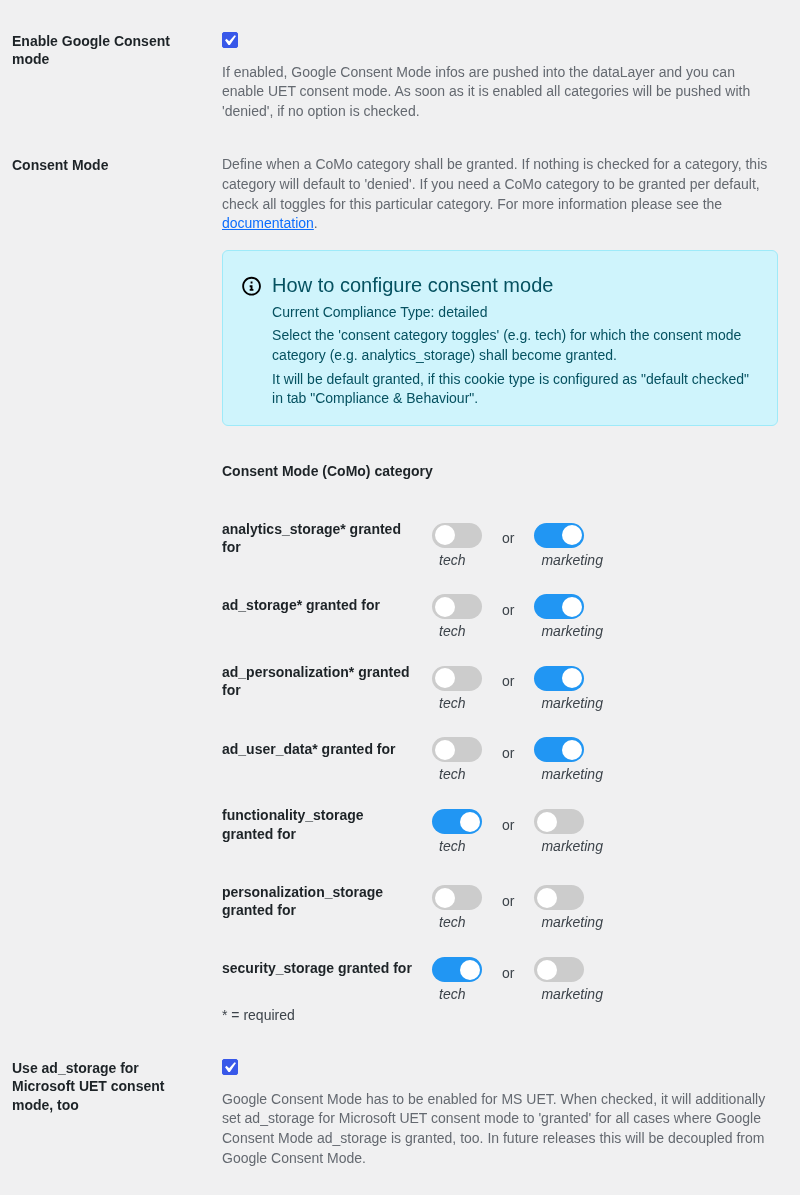
Google Consent Mode needs the Premium add-on. The same settings also drive Microsoft UET consent mode, which uses the ad_storage value.
Next steps
- Google Consent Mode v2 setup example: configure it step by step
- How to test and check Google Consent Mode v2: Tag Assistant,
gcs/gcd, console - Google Tag Manager with the dataLayer: fire your tags on consent
- Microsoft UET consent mode and Microsoft Clarity Consent API