
A Google Tag Manager (GTM) container is the set of tags, triggers and variables that you manage in Google Tag Manager. You add one snippet to your site, and the container then loads your tracking tags, such as Google Analytics 4 or Google Ads, according to its triggers.
The Premium add-on of Beautiful Cookie Banner can add this container snippet for you. It loads the container in a way that fits the cookie consent.
Why load the container through the cookie banner
- If you block GTM with service blocking, the plugin loads the container as soon as the visitor consents, without a page reload.
- The plugin makes sure the scripts run in the right order: consent defaults first, then the container.
- It works better together with caching and optimization plugins.
The plugin only installs the container. That is enough if you have no special tracking needs. If you want to track orders or push more data to the dataLayer, use the plugin GTM4WP together with Beautiful Cookie Banner (see below).
Set it up
- Install and activate the Premium add-on.
- Go to Settings > Cookie Consent Banner > Google Tag Manager.
- Enter your container ID (
GTM-XXXXXXX) in the field GTM ID and save. - Remove any other GTM snippet from your theme or plugins, so the container is not loaded twice.
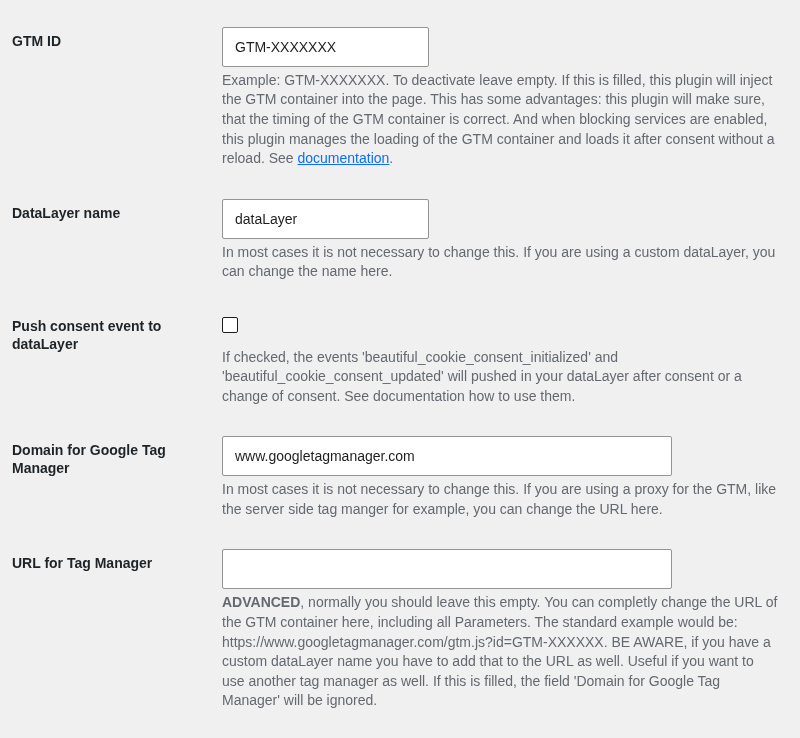
The other fields are optional:
- DataLayer name: change it only if your site uses a custom dataLayer.
- Domain for Google Tag Manager and URL for Tag Manager: for a proxy such as server-side Tag Manager, or another tag manager.
- Push consent event to dataLayer: pushes these two events, which you can use as triggers in Google Tag Manager:
beautiful_cookie_consent_initialized
beautiful_cookie_consent_updated
GTM4WP and Beautiful Cookie Banner
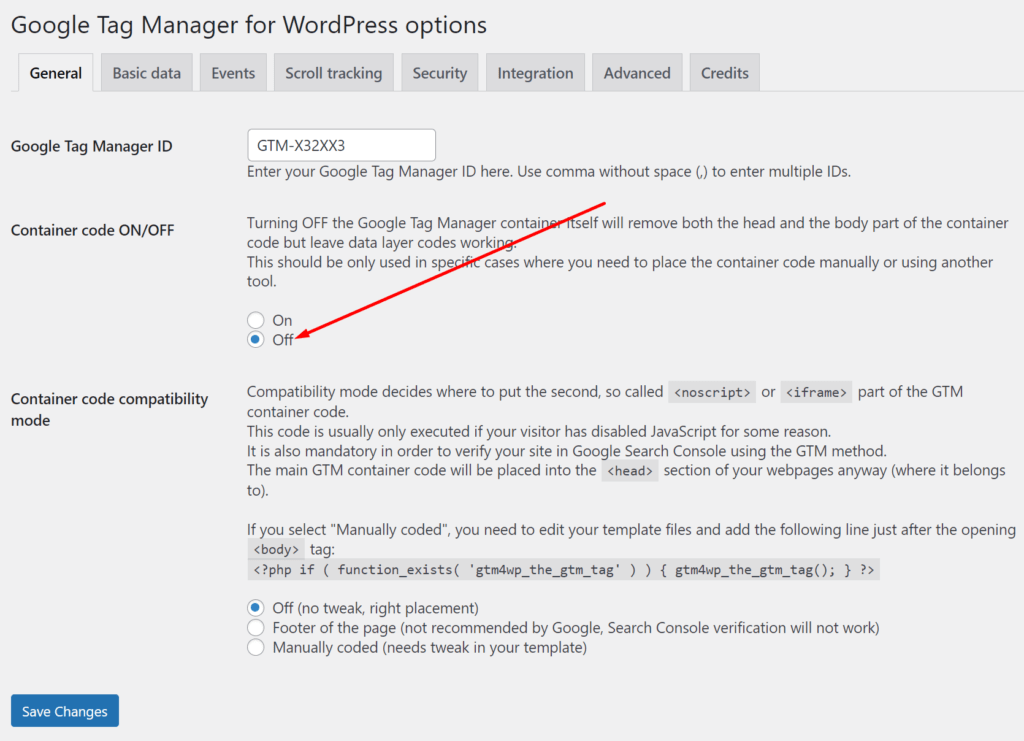
You can combine the dataLayer features of GTM4WP with the container loading of Beautiful Cookie Banner: in GTM4WP, set Container code ON/OFF to “Off”. GTM4WP then fills the dataLayer, and Beautiful Cookie Banner loads the container.
Next steps
The container is now loaded, but the tags inside it still need to fire according to the visitor’s consent. Configure this in Google Tag Manager: